12--Spring Security认证授权流程
前言
在上一章节中,一一哥 带大家认识了Spring Security内部关于认证授权的几个核心API,以及这几个核心API之间的引用关系,掌握了这些之后,我们就能进一步研究分析认证授权的内部实现原理了。这样才真正的达到了 "知其所以然"!
本篇文章中,壹哥 带各位小伙伴进一步分析认证授权的源码实现,请各位再坚持一下吧......
一. Spring Security认证授权流程图概述
在上一章节中,壹哥就给各位贴出过Spring Security的认证授权流程图,该图展示了认证授权时经历的核心API,并且展示了认证授权流程。接下来我们结合源码,一点点分析认证和授权的实现过程。
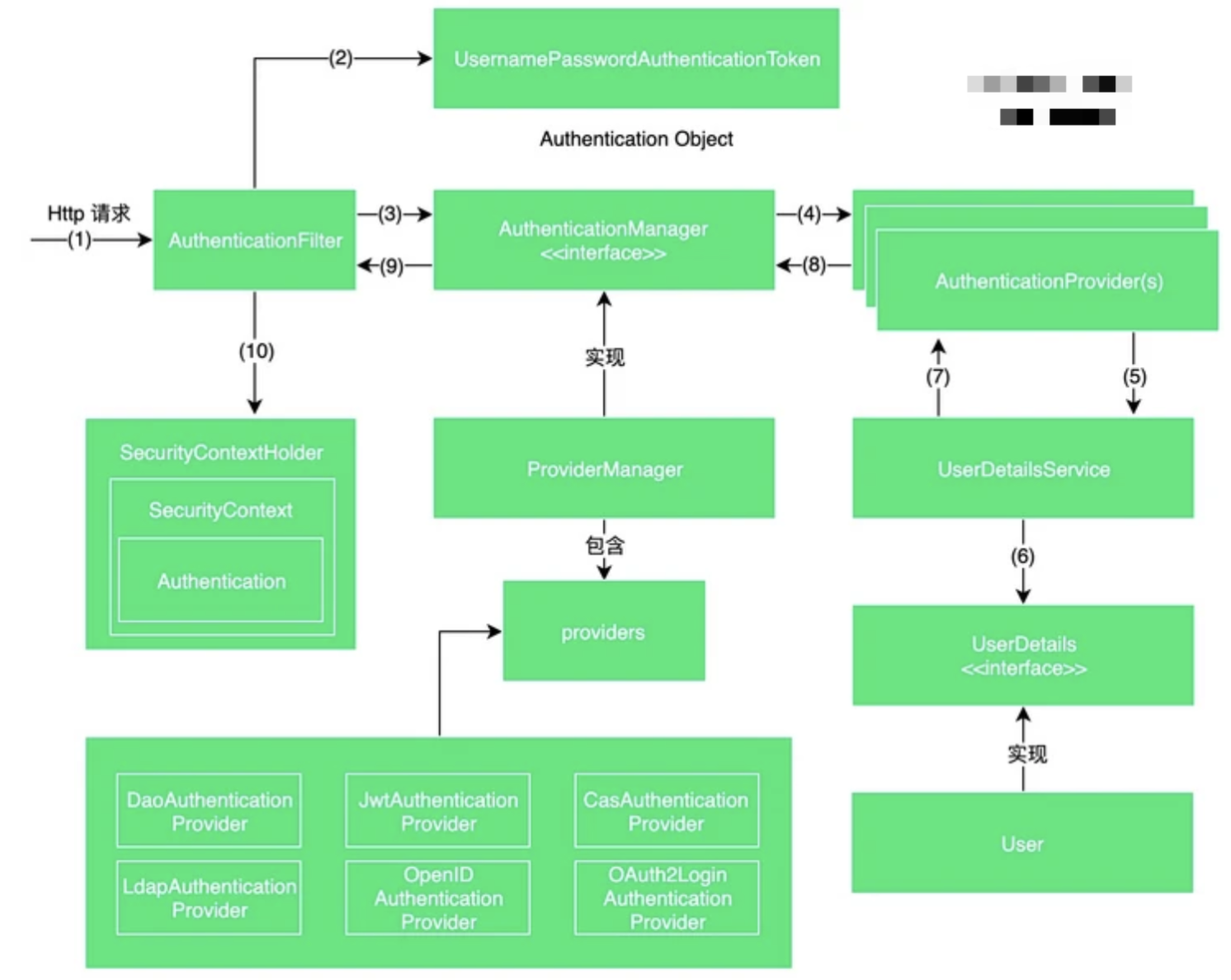
二. 简要剖析认证授权实现流程的代码逻辑
Spring Security的认证授权流程其实是非常复杂的,在我们对源码还不够了解的情况下,壹哥先给各位简要概括一下这个认证和授权流程,大致如下:
1、 用户登录前,默认生成的Authentication对象处于未认证状态,登录时会交由AuthenticationManager负责进行认证;
2、 AuthenticationManager会将Authentication中的用户名/密码与UserDetails中的用户名/密码对比,完成认证工作,认证成功后会生成一个已认证状态的Authentication对象;
3、 最后把认证通过的Authentication对象写入到SecurityContext中,在用户有后续请求时,可从Authentication中检查权限;
我们可以借鉴一下Spring Security官方文档中提供的一个最简化的认证授权流程代码,来认识一下认证授权的实现过程,该代码省略了UserDetails操作,只做了简单认证,可以对认证授权有个大概了解。
public class AuthenticationExample {

	private static AuthenticationManager am = new SampleAuthenticationManager();

	public static void main(String[] args) throws Exception {
		BufferedReader in = new BufferedReader(new InputStreamReader(System.in));

		while (true) {
            //模拟输入用户名密码
			System.out.println("Please enter your username:");
			String name = in.readLine();

			System.out.println("Please enter your password:");
			String password = in.readLine();

			try {
				//根据用户名/密码,生成未认证Authentication
				Authentication request = new UsernamePasswordAuthenticationToken(name, password);
                //交给AuthenticationManager 认证
				Authentication result = am.authenticate(request);
				//将已认证的Authentication放入SecurityContext
				SecurityContextHolder.getContext().setAuthentication(result);
				break;
			} catch (AuthenticationException e) {
				System.out.println("Authentication failed: " + e.getMessage());
			}
		}

		System.out.println("Successfully authenticated. Security context contains: "
				+ SecurityContextHolder.getContext().getAuthentication());
	}
}

//认证类
class SampleAuthenticationManager implements AuthenticationManager {
    //配置一个简单的用户权限集合
	static final List<GrantedAuthority> AUTHORITIES = new ArrayList<GrantedAuthority>();

    static {
		AUTHORITIES.add(new SimpleGrantedAuthority("ROLE_USER"));
	}

	public Authentication authenticate(Authentication auth) throws AuthenticationException {
        //如果用户名和密码一致,则登录成功,这里只做了简单认证
		if (auth.getName().equals(auth.getCredentials())) {
			//认证成功,生成已认证Authentication,比未认证多了权限
			return new UsernamePasswordAuthenticationToken(auth.getName(), auth.getCredentials(), AUTHORITIES);
		}

		throw new BadCredentialsException("Bad Credentials");
	}
}